Introduction
Cloudflare’s dashboard has changed over time, and many users on the Free Plan no longer see a separate “WAF” section. Instead, Cloudflare now manages most firewall and allowlist settings under Security Rules.
The good news is that you can still whitelist your own IP address completely free.
This guide explains the updated method.
Can You Whitelist an IP on Cloudflare Free Plan?
Yes.
Even on the free plan, Cloudflare allows you to create:
- Security Rules
- IP-based Allow Rules
- Basic Firewall protections
You do not need a paid WAF subscription for simple IP allowlisting.
Why Whitelist Your Own IP?
Whitelisting your IP can help:
- Prevent CAPTCHA challenges
- Avoid accidental blocks
- Access WordPress admin safely
- Manage VPS dashboards easier
- Reduce interruptions from Cloudflare security checks
Step 1 — Find Your Public IP Address
You can check your IP here:
Example:
85.xxx.xxx.xxx
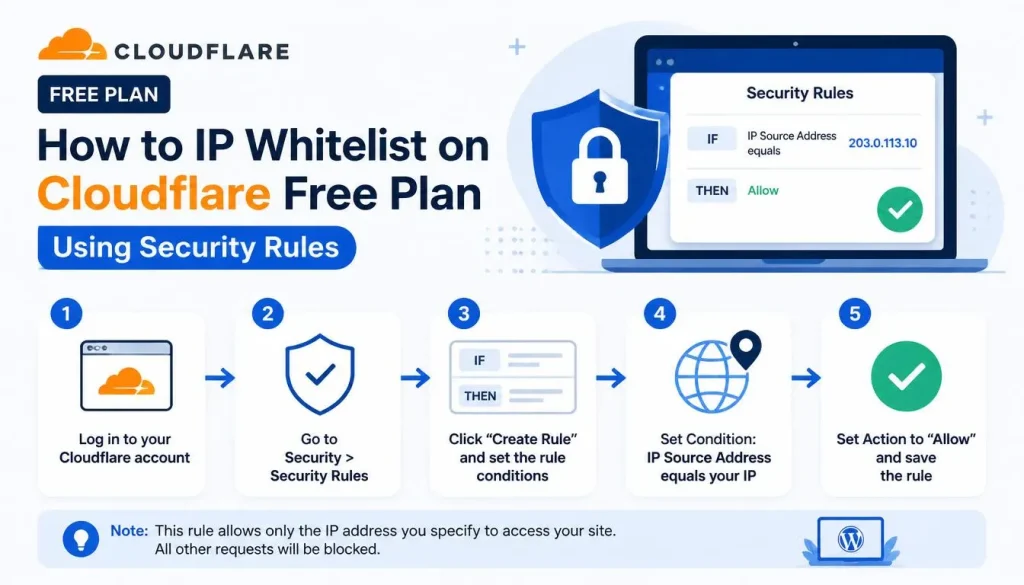
Step 2 — Open Security Rules
- Login to Cloudflare
- Select your domain
- Open:
Security → Security Rules
Step 3 — Create a New Rule
Click:
Create Rule
Then choose:
- Custom Rule
Step 4 — Configure the Rule
Create a condition like this:
ip.src eq 85.xxx.xxx.xxx
Action:
Skip
or
Allow
Recommended Action
For most users:
Skip
is safer because it skips selected security checks while keeping Cloudflare protection active.
Example Configuration
Field:
IP Source Address
Operator:
equals
Value:
85.xxx.xxx.xxx
Action:
Skip
What Does Skip Do?
The Skip action tells Cloudflare to bypass:
- Managed rules
- Bot checks
- Security challenges
- Some firewall protections
for your IP only.
Important Notes
Dynamic IP Addresses
If your internet provider changes your IP address:
- The rule may stop working
- You will need to update it
Do Not Whitelist Unknown IPs
Only allow:
- Your own IP
- Trusted office IPs
- Secure VPN IPs
Avoid allowing large IP ranges.
Alternative Protection Methods
Cloudflare Free Plan also includes:
- Bot Fight Mode
- Under Attack Mode
- DNS Protection
- SSL/TLS encryption
- Basic rate limiting
These features are useful even without paid WAF access.
Conclusion
Even though Cloudflare Free Plan no longer shows a dedicated WAF section for some users, IP allowlisting is still possible using Security Rules.
By creating a simple custom rule, you can safely whitelist your own IP address and improve your workflow while keeping Cloudflare protection enabled.
For personal websites, WordPress dashboards, VPS servers, and self-hosted applications, this method is usually more than enough.